To link your Venmo account to your Invstr+ account, navigate to your account view in Venmo and tap the Settings icon:
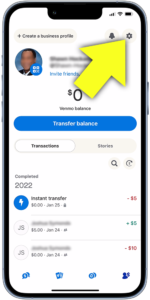
Tap Payment Methods

Tap “Add a bank or card”

Link by card
To link via your Invstr+ debit card, tap “Card”

Enter your Invstr card details, then tap “Add”

And you’re good to go!
Link by bank account
To link via your Invstr+ bank account, tap “Bank”
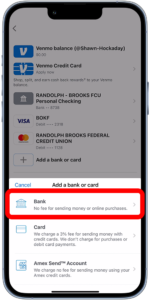
Select your preferred method of verification, then follow the instructions to verify:

Enter your bank account information, then tap “Save and continue”

And you’re good to go!